There is no single answer, because it depends on which Outlook you run and the type of mailbox it connects to. For a Microsoft 365 mailbox, classic Outlook for Windows talks MAPI over HTTP. IMAP and POP are for other mail services, or for third-party apps. The older answer of “POP3, IMAP and ActiveSync” is out of date. In this guide, I’ll show what each client uses, and what is changing with EWS and sign-in.
Quick Answer: Classic Outlook for Windows connects to Exchange Online with MAPI over HTTP, plus EWS and OAB for some features. Outlook on iOS and Android uses Microsoft’s own sync service. IMAP and POP are used for accounts like Gmail or Yahoo. EWS is being switched off in Exchange Online from October 2026, with full shutdown in April 2027.
Which Protocol Each Outlook Client Uses
This table covers a Microsoft 365 (Exchange Online) mailbox, which is what most business users have.
| Client | What it uses with Exchange Online | Notes |
|---|---|---|
| Classic Outlook for Windows (2016 and later, Microsoft 365 Apps) | MAPI over HTTP, plus EWS and OAB for some features | MAPI over HTTP carries the mailbox. EWS and OAB are used for free/busy, out of office and the offline address book |
| New Outlook for Windows | Microsoft does not publish the protocol | Supports Microsoft 365 work or school accounts, Outlook.com, Gmail, Yahoo, iCloud and other IMAP/POP accounts. No on-premises Exchange accounts |
| Outlook for Mac (new) | Microsoft’s cloud sync technology | Legacy Outlook for Mac relied on EWS and stops working with Exchange Online from October 2026 |
| Outlook for iOS and Android | Microsoft’s native sync, over HTTPS with OAuth | Not Exchange ActiveSync, and no middle service in between |
| Outlook on the web | Browser, nothing to set up | No client protocol for you to configure |
I left the new Outlook row open on purpose. Microsoft documents which accounts it supports, but I could not find any page that names the wire protocol it uses for Exchange Online. Some sites state one anyway. Until Microsoft says it, I would not repeat it.
If you are not sure which Outlook you have, here is how to check your Outlook version.
MAPI over HTTP: What Classic Outlook Uses
MAPI over HTTP is the transport that carries Outlook’s connection to Exchange over normal HTTP. Its main benefit is recovery. After a network break, only the TCP connection is rebuilt, so Outlook reconnects faster, and the session survives a change of network. Microsoft explains it on the MAPI over HTTP page. To see which servers actually handled a message and how long each step took, paste its headers into my free email header analyzer. It also shows the SPF, DKIM and DMARC results in plain English.
It replaced RPC over HTTP (also called Outlook Anywhere). Outlook 2013 SP1 and later support it. Outlook 2007 never got it, and RPC over HTTP has been unsupported for Exchange Online since 31 October 2017.
On Exchange Server on-premises, MAPI over HTTP is on by default when you upgrade from Exchange 2016 or 2010. It stays off if the organization still has an Exchange 2013 server.
EWS Retirement in Exchange Online
Exchange Web Services (EWS) is the older SOAP-based API that many Outlook features, add-ins and third-party tools still call. Microsoft’s EWS deprecation page gives two dates: disablement starts for all organizations in October 2026, and EWS is fully disabled in April 2027.
What I can say about the detail:
- The Register reported that the rollout started on 1 October 2026, and that Microsoft says there are no exceptions for April 2027. This part is press-sourced.
- Message Center post MC1227454 describes the mechanics: EWS is blocked unless the tenant has an allow list of app IDs and EWS is enabled. I read it through mirror sites, not Microsoft’s own page.
- A Microsoft Exchange team post, which I could read only as a secondary summary, says April 2027 is when the final disablement process starts, with clean-up into May. So treat it as April 2027, with a few weeks of tail.
- Exchange Server on-premises is not affected. EWS stays supported there.
The scope is wider than it looked in 2023. The original announcement targeted third-party apps and said Outlook for Windows and Mac were not affected. After the Midnight Blizzard attack in January 2024, Microsoft widened it to its own apps and is removing EWS dependencies from Outlook, Office and Teams. Legacy Outlook for Mac is the clear casualty, since it depends on EWS.
For admins, the first step is the EWS usage report in the Microsoft 365 admin center (Reports > Usage). It shows which apps still call EWS, and that tells you what will break first: backup tools, CRM connectors and migration tools are the usual suspects. I wrote the full admin checklist in our EWS retirement post.
Microsoft Graph: The Replacement for Developers
Microsoft Graph is a REST/JSON API with OAuth and granular permissions, where EWS was SOAP with broad, all-or-nothing access. Microsoft’s migration overview names it as the way forward for Exchange Online.
Graph is a developer API. An Outlook user never sets it up, and it is not a mail protocol in the POP or IMAP sense. Two limits are worth knowing:
- Graph works with Exchange Online and hybrid, not with Exchange Server on-premises.
- The mail API covers primary and shared mailboxes, but not in-place archive mailboxes.
Microsoft’s own parity list also shows gaps that were still open, with dates running to the end of 2026. A few EWS features, such as generic public folder access, are confirmed as not coming to Graph. If a tool you rely on needs one of those, ask the vendor now.
Basic Authentication Is Gone, OAuth Replaced It
Basic authentication (username and password sent with every request) has been removed from Exchange Online for Exchange ActiveSync, POP, IMAP, EWS, OAB, Autodiscover, and Outlook for Windows and Mac. Microsoft’s basic authentication page says nobody can turn it back on.
One protocol is still waiting. SMTP AUTH with Basic was only disabled where it was unused. The dates I found, from mirror sites and not Microsoft’s own pages, say it turns off by default for existing tenants at the end of December 2026, with a final removal date still to be announced. These dates have moved twice, so check the current Microsoft post before you plan around them.
On Windows and Mac, the Outlook apps sign in with modern authentication (OAuth) when you use an Exchange profile. Version 2016 and later have it on by default. Outlook 2013 needs a registry setting, and 2007 and 2010 cannot do it.
IMAP, POP and SMTP: When Outlook Still Uses Them
IMAP and POP are the protocols for accounts that are not Exchange: Gmail, Yahoo, iCloud and many hosted mailboxes. New Outlook accepts them too. They both rely on SMTP for sending.
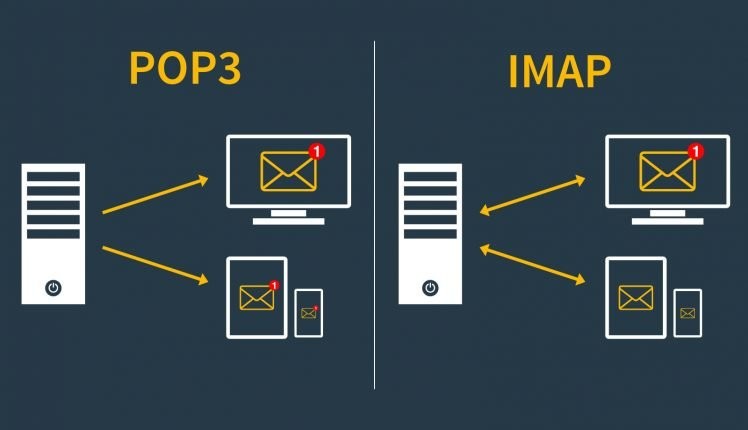
IMAP keeps the mail on the server. You see all folders, and a change in one app shows in the others. IMAP also has an IDLE feature that gives near-instant delivery of new mail.
POP3 downloads mail to one device and, by default, removes it from the server. It pulls only the Inbox, so your Sent Items and other folders never come across, and there is no public folder support.
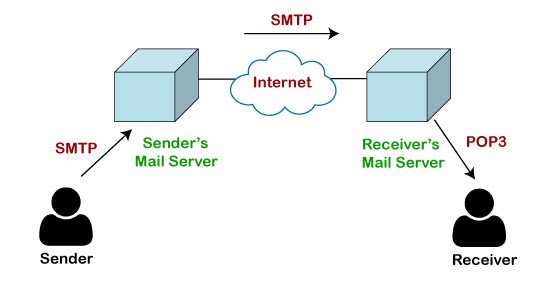
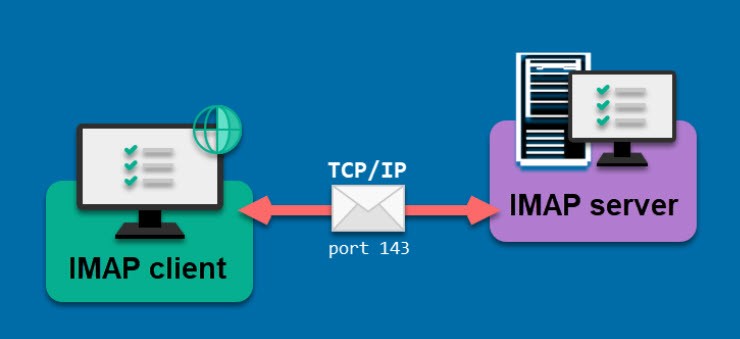
For Exchange Online, Microsoft lists these endpoints in its POP3 and IMAP4 guide:
- POP3: outlook.office365.com, port 995, SSL/TLS
- IMAP4: outlook.office365.com, port 993, SSL/TLS
- SMTP: smtp.office365.com, port 587, STARTTLS
IMAP and POP are on by default for each user, and Security Defaults turns them off automatically. Because Basic authentication is gone, they only work in apps that support OAuth, which is where Thunderbird-type clients come in. Microsoft says there is no plan for Outlook to support OAuth for POP and IMAP. So a Microsoft 365 account in classic Outlook should be a normal Exchange account, not an IMAP or POP one.
Exchange ActiveSync still exists for the built-in mail apps on phones, but it also lost Basic authentication. Microsoft recommends Outlook for iOS and Android instead.
Frequently Asked Questions
Does Outlook use IMAP or POP for Microsoft 365?
No. For a Microsoft 365 mailbox, classic Outlook uses MAPI over HTTP. IMAP and POP are for other providers and third-party apps.
Does Outlook for Windows stop working when EWS is switched off?
Classic Outlook carries the mailbox over MAPI over HTTP, and EWS is used for some features only. Microsoft says it is removing those dependencies from Outlook. Legacy Outlook for Mac is different, because it needs EWS and stops working with Exchange Online from October 2026.
Is Exchange ActiveSync the same as what Outlook mobile uses?
No. Outlook for iOS and Android uses Microsoft’s own sync service. ActiveSync is what the phone’s built-in mail app uses.
Does POP3 download every folder?
No, only the Inbox. If you need all folders on more than one device, use IMAP or a normal Exchange account.
What to Check Next
If you are a user, open your account settings and confirm that a Microsoft 365 mailbox is added as an Exchange account, not as IMAP. If you support users, start with the EWS usage report, and contact any vendor still calling EWS before April 2027. For the Mac side, our post on Outlook for Mac vs Apple Mail covers the client choice.

3 thoughts on “What Protocol Does Outlook Use Now: MAPI, EWS, Graph and IMAP”